

GoSite

Latest version:
unknown
See all

Spin up your service hub in an afternoon. Start by picking a site layout, drop in your logo and colors, then assemble pages with the visual builder—move sections, swap images, and add service lists, FAQs, and contact forms. Connect your domain and publish when it looks right. Link your Google Business Profile to sync hours, phone, and location so people can call or get directions straight from search. Add a simple lead form that routes inquiries to your inbox and tags them by service type. If you’re writing content, create a few evergreen posts (pricing, policies, what to expect) and schedule them. Set basic SEO fields on each page and preview how your listing appears before you go live.
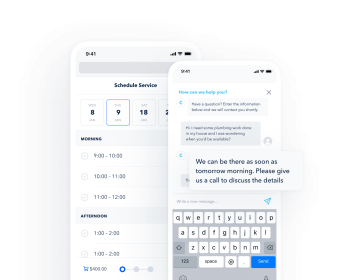
Next, make booking effortless. Create each offering with duration, price, buffers, and prep notes. Set staff availability, assign services to team members, and define rules for cancellations or rescheduling. Add intake questions so you collect details upfront. Flip on confirmations and reminders by email and text to cut no‑shows. Decide if you’ll require a deposit or full prepayment, then generate checkout links your clients can use anytime. The shared calendar keeps the whole team aligned, and conflicts are flagged instantly. On mobile, your crew can view their day, update appointment status, and message clients without switching apps.
Keep demand steady with built‑in marketing and reputation tools. Connect Instagram, Facebook, and X to schedule posts, reply to comments, and track reach, clicks, and bookings from each channel. Use simple dashboards to see which campaigns actually bring customers, then shift budget or timing accordingly. Turn on automatic review requests after completed jobs, monitor new ratings in one place, and reply with saved templates or personalized messages. Sentiment insights highlight common praise or complaints so you can adjust offers, training, or scripts. When a negative comment lands, you’ll get an alert and can respond quickly before it spreads.
Tidy up operations as you grow. Sync invoices and payouts with QuickBooks so revenue and taxes stay organized. Connect Outlook or Gmail to bring messages and calendar events into a single timeline for each client. Use the team inbox to assign conversations and track response times; light gamification (scores and badges) can motivate faster follow‑ups. For recurring work, set automatic schedules and charges, then let the system send reminders and receipts. Whether you run a salon, cleaning crew, landscaping outfit, tutoring service, or home repair business, the Android and iOS apps keep you moving—capture notes and photos on‑site, collect payment before leaving, and finish your day with everything already logged for reports and payroll.
Free
Free
Contact Hub
Payments
GoSite Mobile App
Run day-to-day business operations entirely from your phone, on iOS & Android
Gosite Professional
Custom
Includes features of Free plan, plus
Sites
Messenger
Booking
Reviews


Comments